An issue tracking system allows bug tracking and project management.
Project Type
Collaboration Web Platform
duration
04/2020 – 06/2022
My Role
Lead UX Designer
Team Members
Software PM Web Developers x 8 UX Designer
THE CHALLENGE
Build a new issue tracking system from start to finished.
Collaborate with the cross-departmental scrum team with 10+ members.
MY CONTRIBUTION
Helped the team to clarify requirements and define functional specs through questionnaires and competitor analysis.
Led the design of key functions, including drawing user flows, wireframes, and delivering detailed interaction design specs for smoother communication.
Established the UX Guidelines to maintain the design consistency and reduce development resources.
Conducted 10+ usability tests to improve the user experience of the search component and the entire system.
Mentored a mid-level UX designer for building the UX guideline and conducting usability tests.
Outcome & Impact
Increased system satisfaction (System Usability Scale) by 95%.
Resolved 94% of the usability issues, improving 700+ internal users’ work efficiency.
Management was so impressed with the product that it will potentially be offered for sale to external customers.
The old bug tracking system has been used by internal members for 20 years. When I started to use it, I thought the user experience was so poor it affected work efficiency. I really wanted to improve it, but the company didn’t have the resources. Recently, there were problems with data loss. To prevent it from happening again, we decided to build a new system. So I began the project with a scrum team with 10+ members from different departments.
My Approach
1. Research
Clarify the Problems with Questionnaires and Interviews
Persona
Competitor Analysis of Issue Search
2. Design
Information Architecture
Site Map
Layout Structure
Key Functions
Define Design Guidelines
3. Validation
Rapid Usability Test of Issue Seach
Formal Usability Test
Research
Clarify the Problems with Questionnaires and Interviews
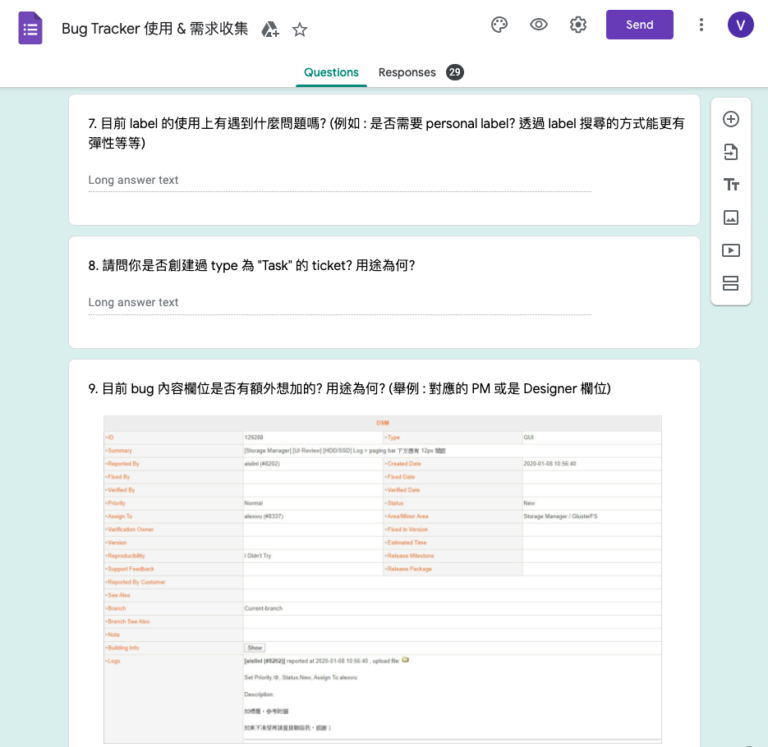
To understand the problems and requirements of internal users, I designed a questionnaire and sent it to the PM, UI/UX design and Writer teams. I also interviewed RD and QC teams to understand their individual needs. I clarified the problems by categorizing the issues from 29 questionnaires and interviews.
The questionnaire to understand their individual needs
Categorized problems and requirements
Main problems:
1. Hard to create an issue successfully
It is difficult for new users to understand the meaning of the many fields
The required fields are not clear
Existing content will disappear when the network connection is interrupted
2. The current search functions and designs do not meet user needs
Insufficient search criteria
Users can’t search issues across projects
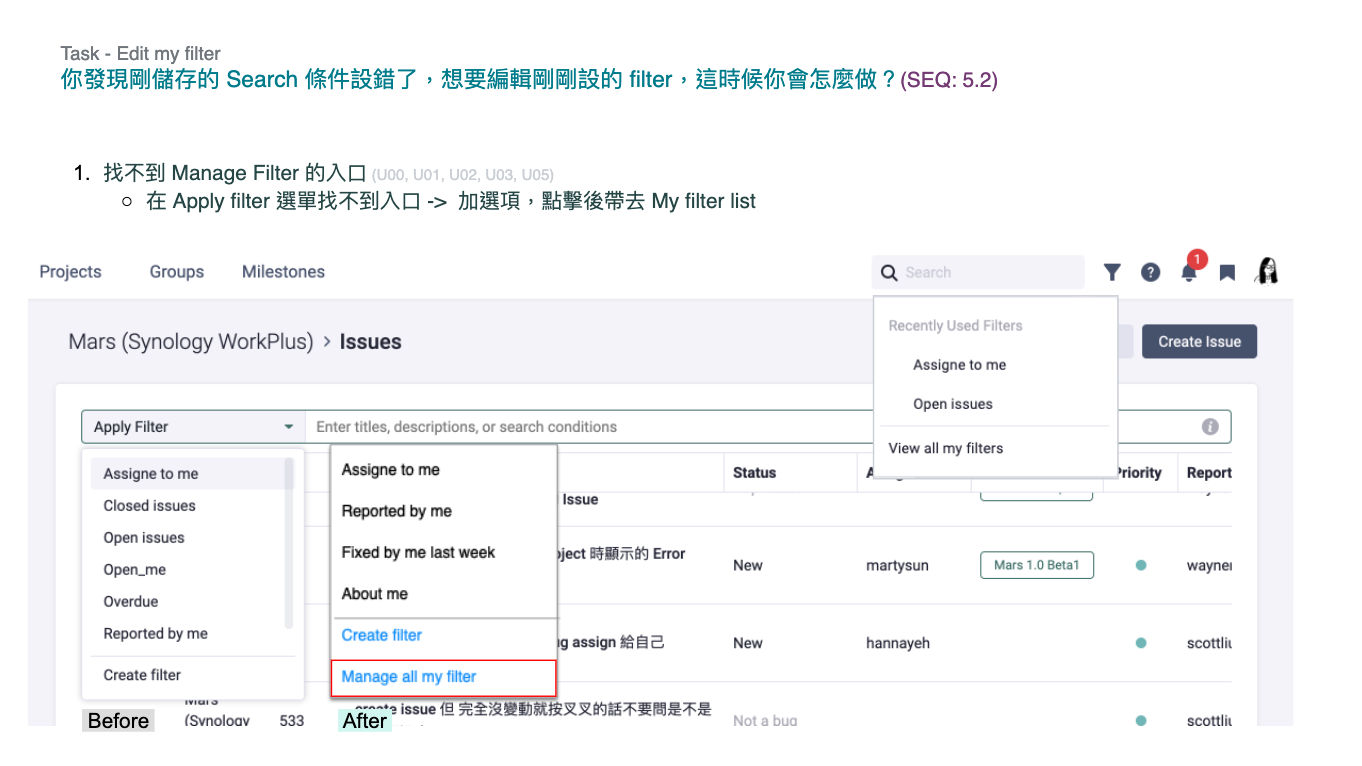
The flow of creating a custom filter is cumbersome
3. Difficult to manage and check the project schedule
Users cannot know the deadline of issues from the system
It is hard for users to distinguish the milestones from general labels
Users do not understand the dependency between project milestones
Persona
I defined the personas of the system based on the questionnaire and interview results to make team members familiar with the target users. Therefore, when we are discussing the function or the design, we can focus on the personas' scenario.
Jason
Software Developer
Goals
To search the issues by setting more search criteria
To quickly find issues with the previous search criteria
To transfer the issues to others when handing over a project
Frustrations
Search criteria are not enough
Custom filters are hard to be set
Users spend too much time handing over issues
Amanda
Project Manager
Goals
To check how many unresolved issues of a milestone
To allow project members to easily find the project schedule
To grasp the milestone which is related to my project
Frustrations
Hard to find the unsolved issues of a milestone
Project members often ask me the schedule because they can't find it
Difficult to know the update of the milestone which related to my project
Roxy
UI Designer
Goals
To quickly find the issues assigned to me
To quickly create an issue for UI/UX review
To easily check the project schedule
Frustrations
Can’t search for the issues across the project
Need to try many times to create an issue
Hard to find where the milestone document is
Mike
Quality Control Specialist
Goals
To quickly find the issue with specific labels
After the creating flow is interrupted, users can continue to finish the field of an issue
To check the related project schedules for resource management
Frustrations
Too much time spent searching the issues with specific labels by creating a filter
Existing content will disappear when the network connection is interrupted
Hard to know the project milestones' dependency
Competitor Analysis of Issue Search
According to the user feedback, the issue search function is unable to match user needs. To define the scope of the function, I researched 4 competitors that are used by internal users or with similar functions to the old system.
AND logical operators
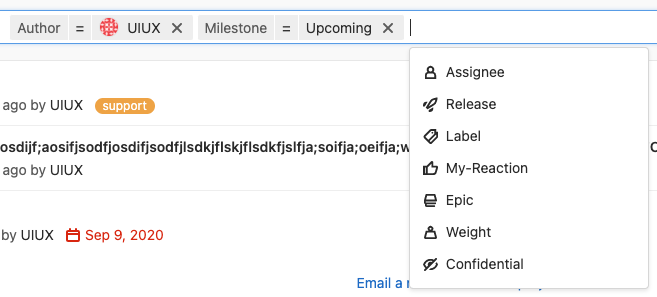
Gitlab issue search: All criteria in one search bar. Users can type or select the criteria.
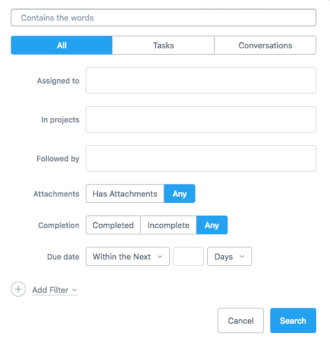
Asana issue search: The search panel includes text fields and options
AND/OR logical operators
Jira advanced issue search: All criteria in one search bar. Users need only to type in the criteria.
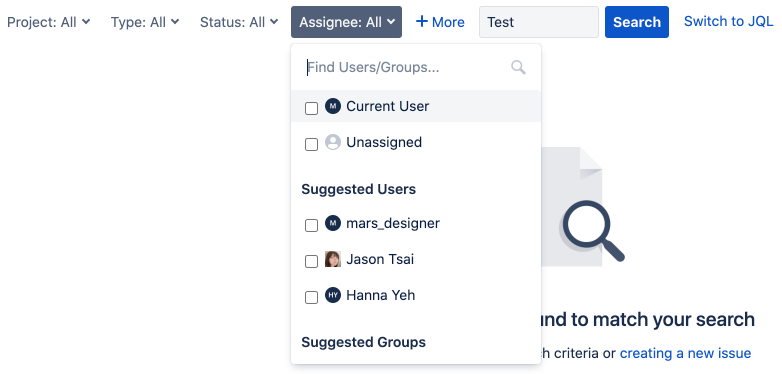
Jira basic search: The search criteria setting includes text fields and options
Function Comparison
Competitors
Gitlab
Jira
Asana
Backlog
Workplus 👑
Support "AND" and "OR" logical operators
"AND" only
"AND" and "OR"
"AND" only
"AND" only
"AND" and "OR"
Support "=" and "=!" operators
"=" and "=!"
"=" and "=!"
"=" only
"=" only
"=" and "=!"
The design of issue search
All criteria in one search bar. Users can type and select the criteria.
Basic search: The search criteria setting includes text fields and options
Advanced search: All criteria in one search bar. Users can only type the criteria.
The search panel includes text fields and options
The search criteria setting includes text fields and options
All criteria in one search bar. Users can type and select the criteria.
Insight
Only Jira supports "And" and "Or" logical operators. Though the search criteria are more flexible than other competitors, it is more complicated for normal users.
Jira and GitLab allow "=" and "=!“ operators (e.g. milestone = 1.0) which result in flexible searches.
Gitlab improves usability by combining dropdown menu options, which is more user-friendly than Jira's issue search.
To meet user needs, our goal is to build an issue search with "And" and "Or" logical operators, which is more flexible than Gitlab and more friendly than Jira.
Design
Information Architecture
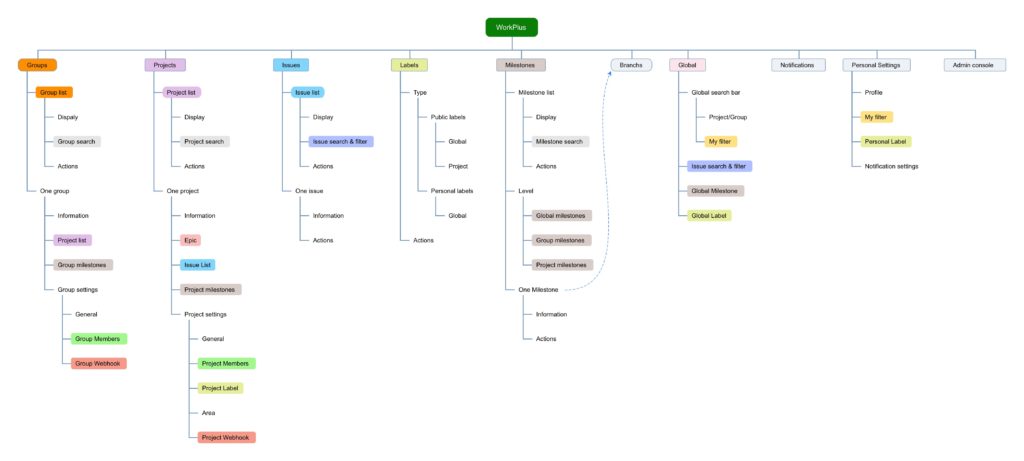
I surveyed the information structure of the competitors based on user needs. To understand the relationship of information, I drew the information structure below.
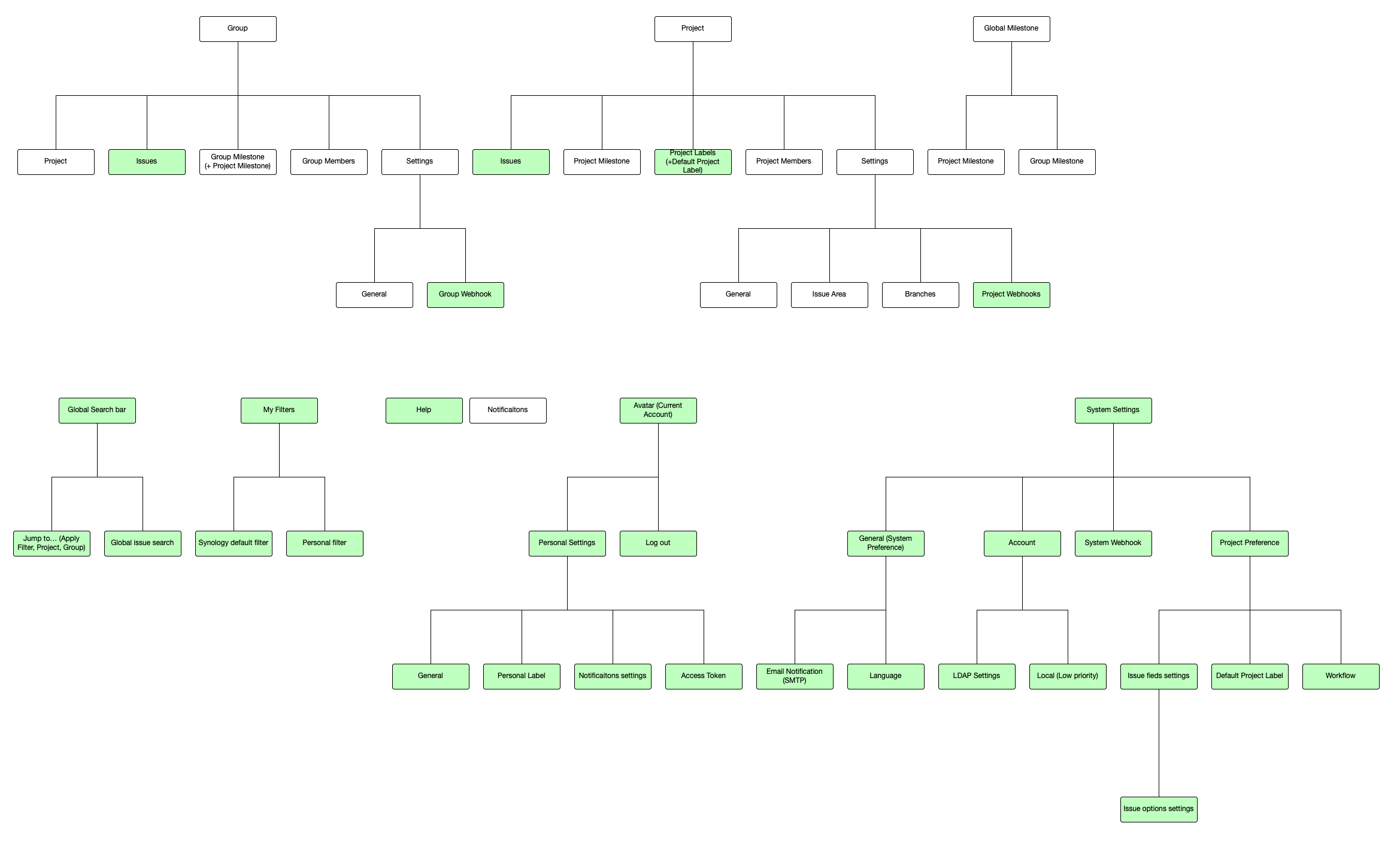
Site Map
I organized the sitemap to clarify the relationship of pages and discussed the work division with a collaborative UX designer.
System site map: I was responsible for the green blocks
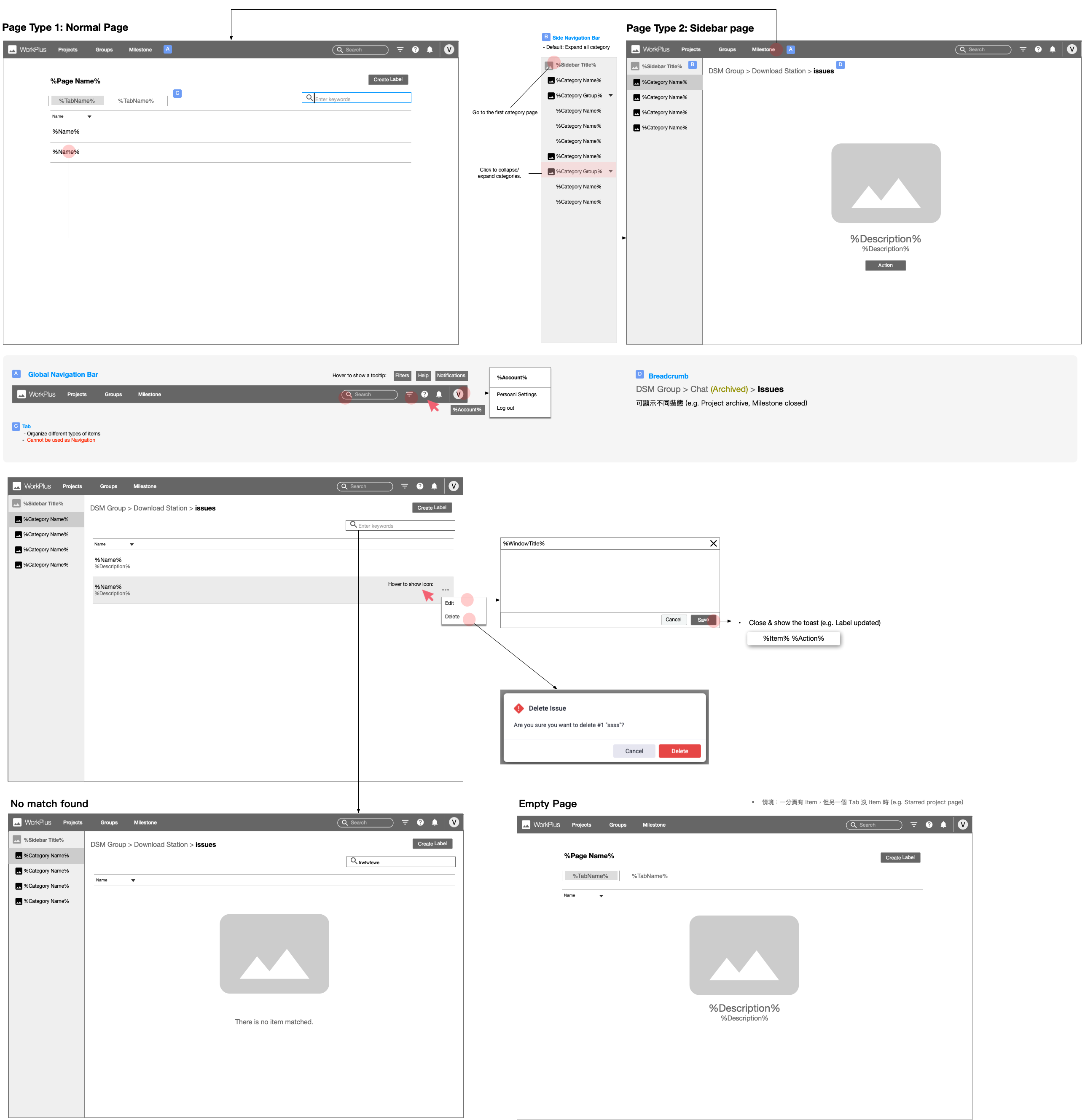
Layout Structure
To ensure design consistency, I defined the rules of each layout structure and discussed them with the collaborative UX Designer. Even if we are designing different pages or functions, we can still follow the same rules.
Key Functions
Create/Edit issue
Design Goal: Users can quickly create and edit issues
What I have done:
Deleted unnecessary fields and duplicated functions to reduce information complexity.
Showed the frequently used fields in the front, and sorted them according to the order in which users fill in.
Marked the required fields with *, so that users can easily find the required fields.
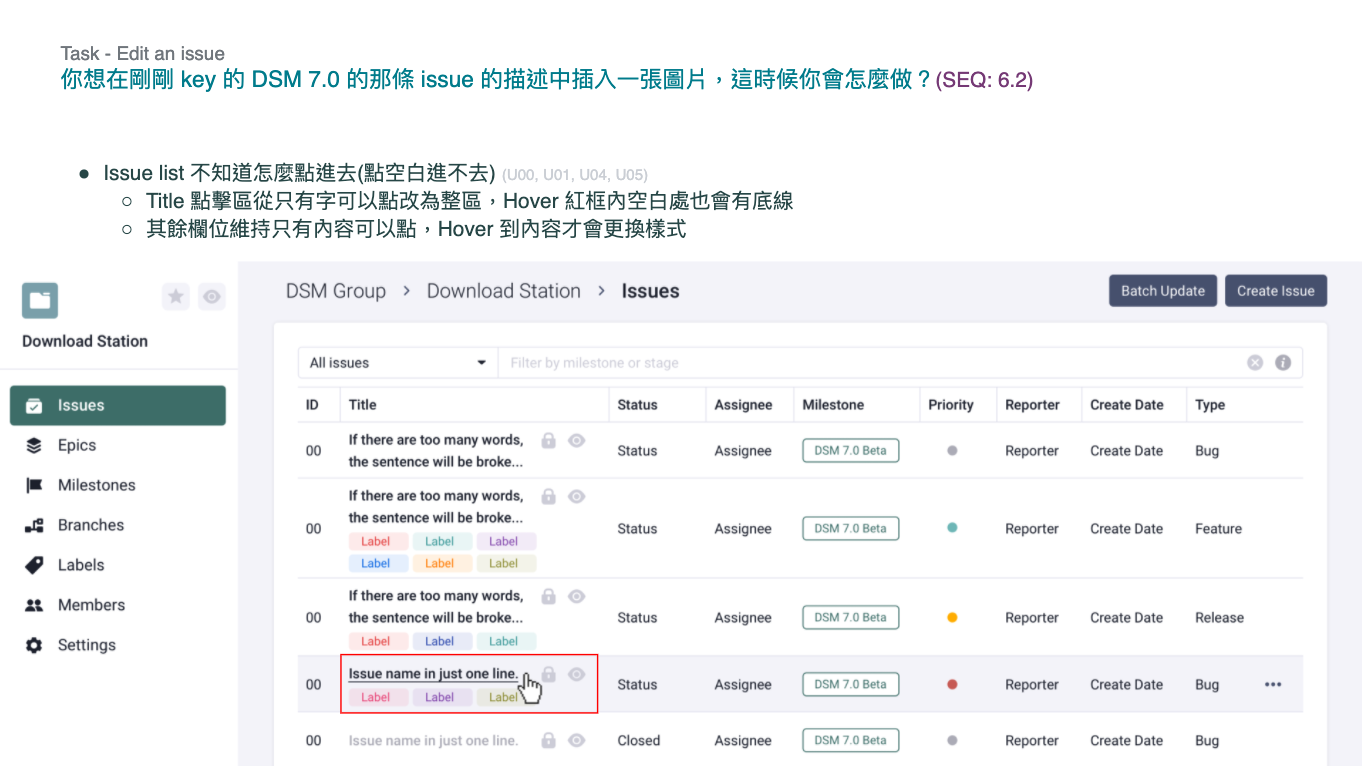
Users can click on the field to edit quickly.
Milestone
Design Goal: Users can check the issue's milestone, and when to finish the issue.
What I have done:
Users can set a milestone for each issue
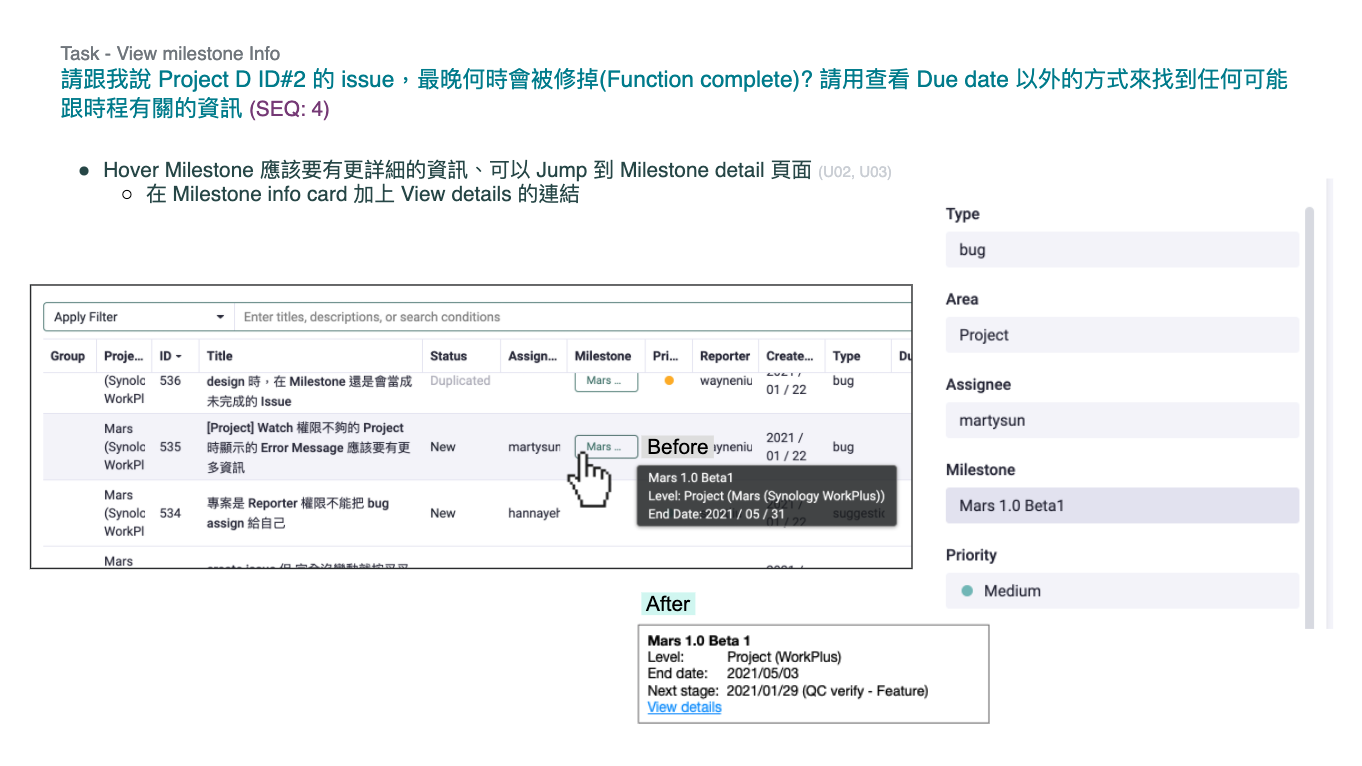
Hover over the milestone on an issue to see the schedule, and click to view the details of the entire milestone
Search & filter
Design Goal: Flexible and friendly issue search
What I have done:
Users can type or select the needed criteria.
Users can flexibly use AND/OR and =/=! operators to set search criteria
Users can search for issues across projects and use saved filters to find issues quickly
Define Design Guidelines
To ensure the consistency of components and layouts, I defined the design guideline while designing functions and mentored another UX designer to write them. We keep all members updated by frequent releases.
Validation
Before the system was officially released, we ran two kinds of usability tests, one was for verifying the function and the design of the issue search (Rapid Usability Test), and the second was for verifying the design of the key functions (Formal Usability Test).
Rapid Usability Test of Issue Seach
After discussing the rules of issue searches with the team, I asked the RDs to implement a prototype for the usability test. I invited 9 users from different positions (QC*2, PM*2, RD*2, UI*2, Writer *1) to usability tests. The main problems are as below:
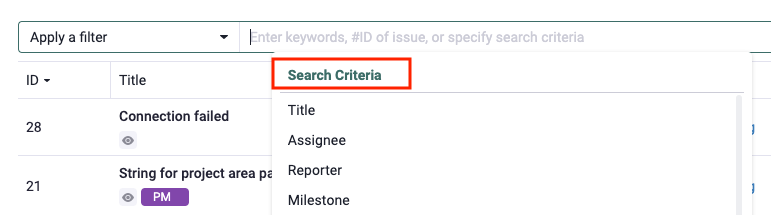
Problem 1. Hard to find where to set search criteria (2 subjects)
Some subjects misunderstood the search criteria in the dropdown menu as historical records, so they took some time to find the search criteria.
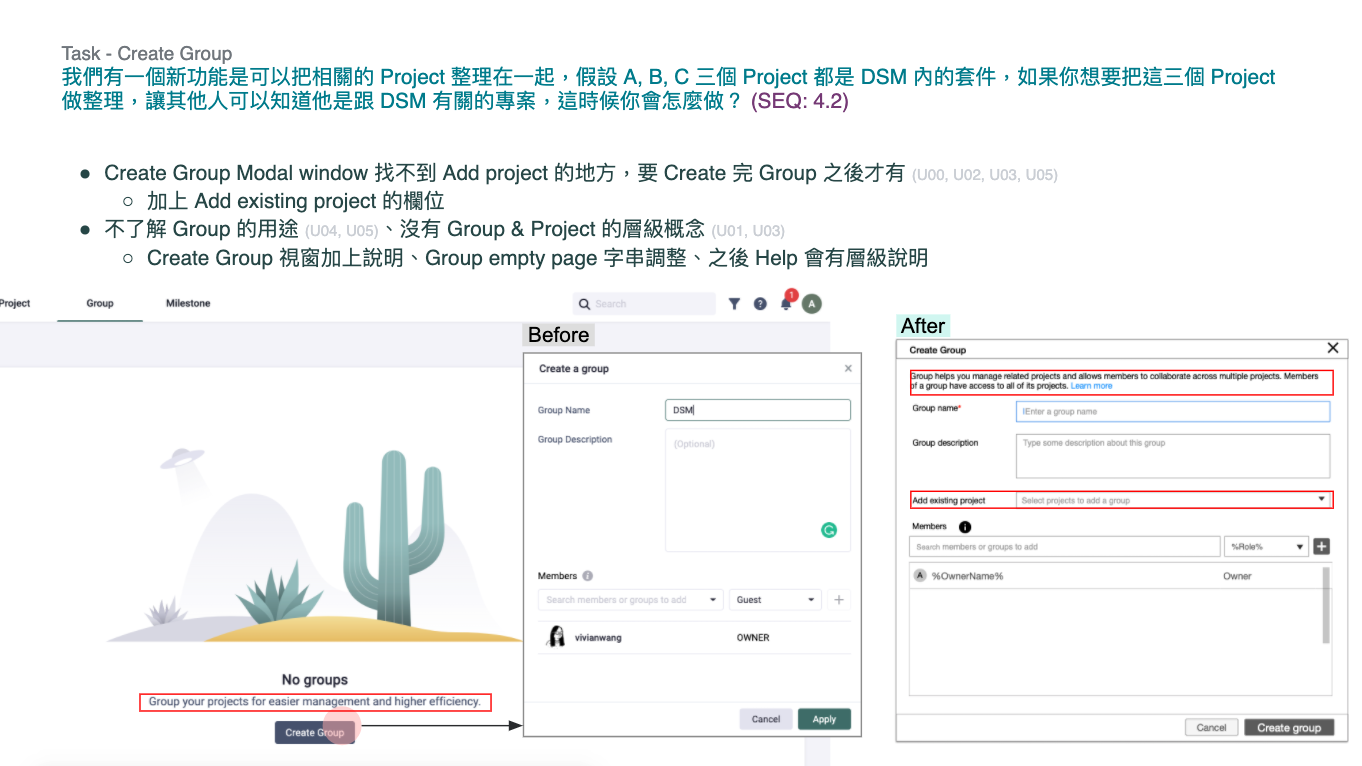
Design Changes: Added a title in the dropdown menu to make it more clear
Problem 2. Not familiar with the existence of AND/OR and = / =! operators (8 subjects)
Subjects need to input AND/OR to connect search conditions. Some subjects thought that search conditions were connected with the default "AND", so they thought that it was not necessary to input it. Some subjects also didn’t input =/=! operators because they didn't notice them when typing. Due to the incomplete search conditions, they can’t find any results.
Design Changes:
After users apply the input, the system will automatically fill in "AND" to prevent an incomplete format
After users apply the input, the system will automatically fill in the default operator (e.g. "=") to prevent an incomplete format
Problem 3. Didn't know the meaning of "()" and how to use it. (2 subjects)
If subjects want to use AND/OR to connect search conditions at the same time, they need to use () to set the order of operation. But some subjects don't know the meaning and how to use it.
Design Changes:
Because AND and OR are not usually used simultaneously, so we hid the option () in the dropdown menu to make it an advanced search criteria.
Provided tips to guide users on the usage of AND/OR and brackets. (e.g. (A OR B) AND C )
Formal Usability Test
The major difference compared to the old system is that we combined the concept of project management into the new system. So the test scope included project management and key functions. I invited 6 users (RD Manager x 4, PM x 2) with project management requirements to the usability test.
Test Preparation
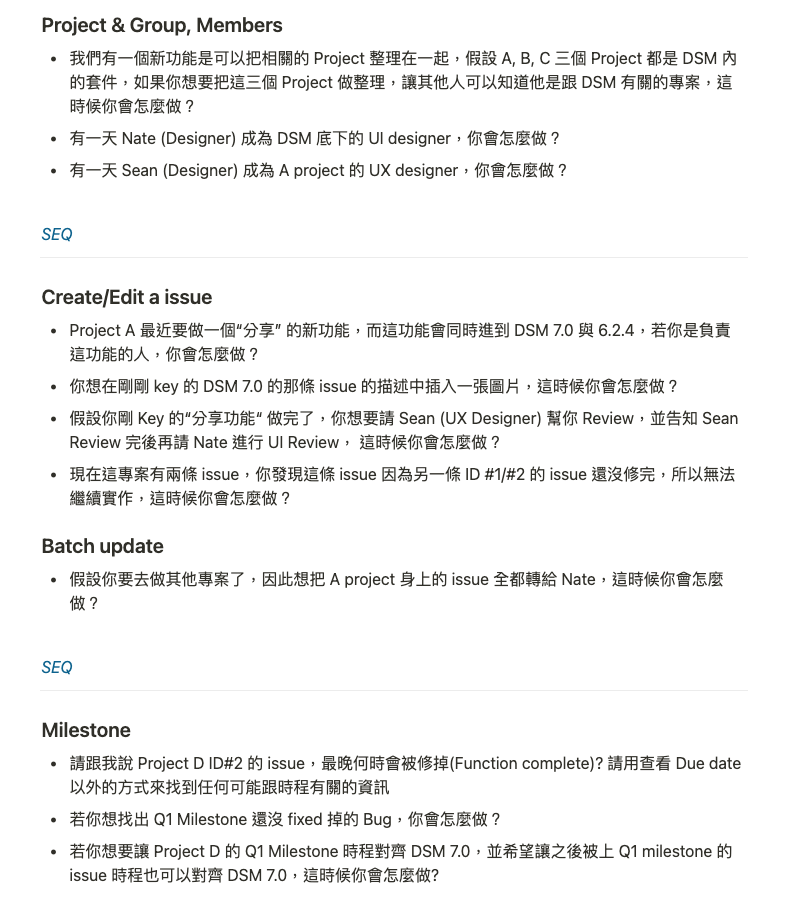
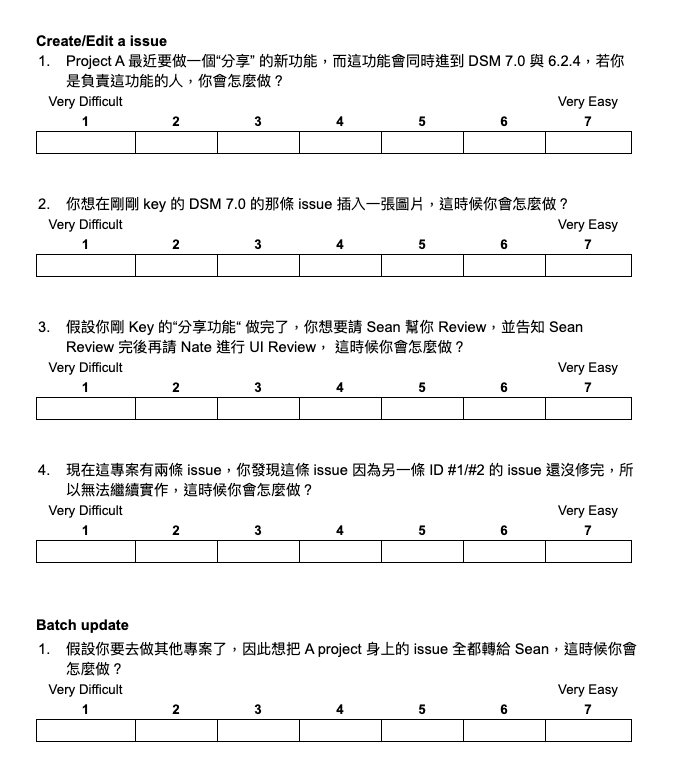
I planned the test tasks based on the work scenario of the RD Manager and PM. When the test is in progress, I will provide a Single Ease Question (SEQ) questionnaire (a 7-point rating scale to assess the difficulty of a task) to subjects. 1 is the most difficult, and 7 is the easiest.) When the subjects finished all the tasks, I clarified why these tasks are below 5 points.
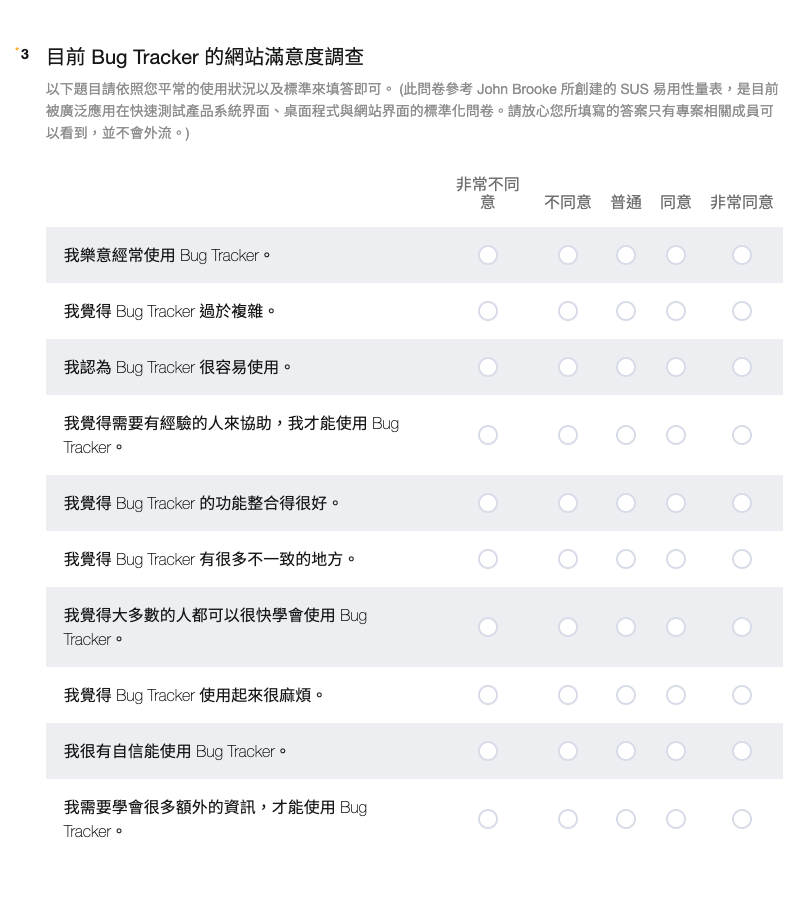
To scale the usability improvement, I asked them to fill out a System Usability Scale (SUS) questionnaire and compared the score between the new and old systems.
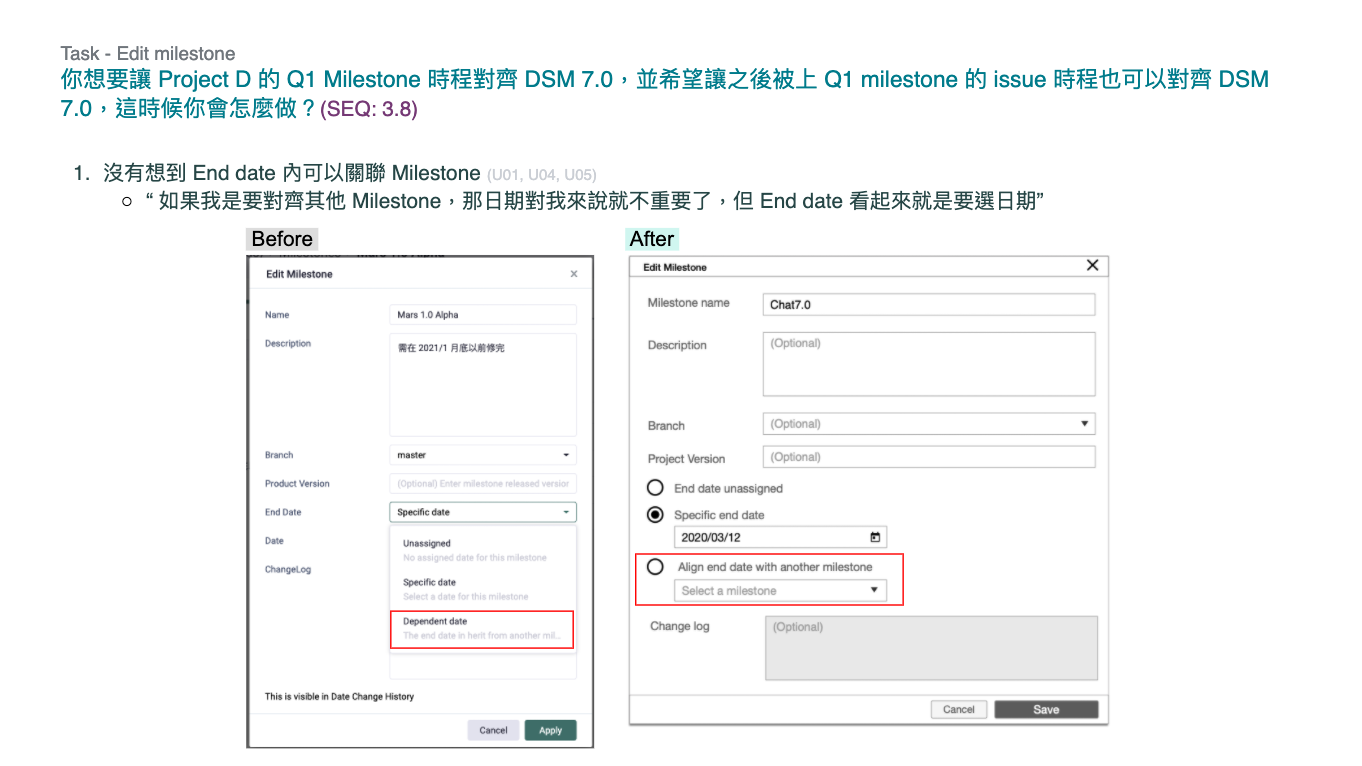
Testing script including test tasks and interview questions
SEQ questionnaire
SUS questionnaire
Conduct Usability Test
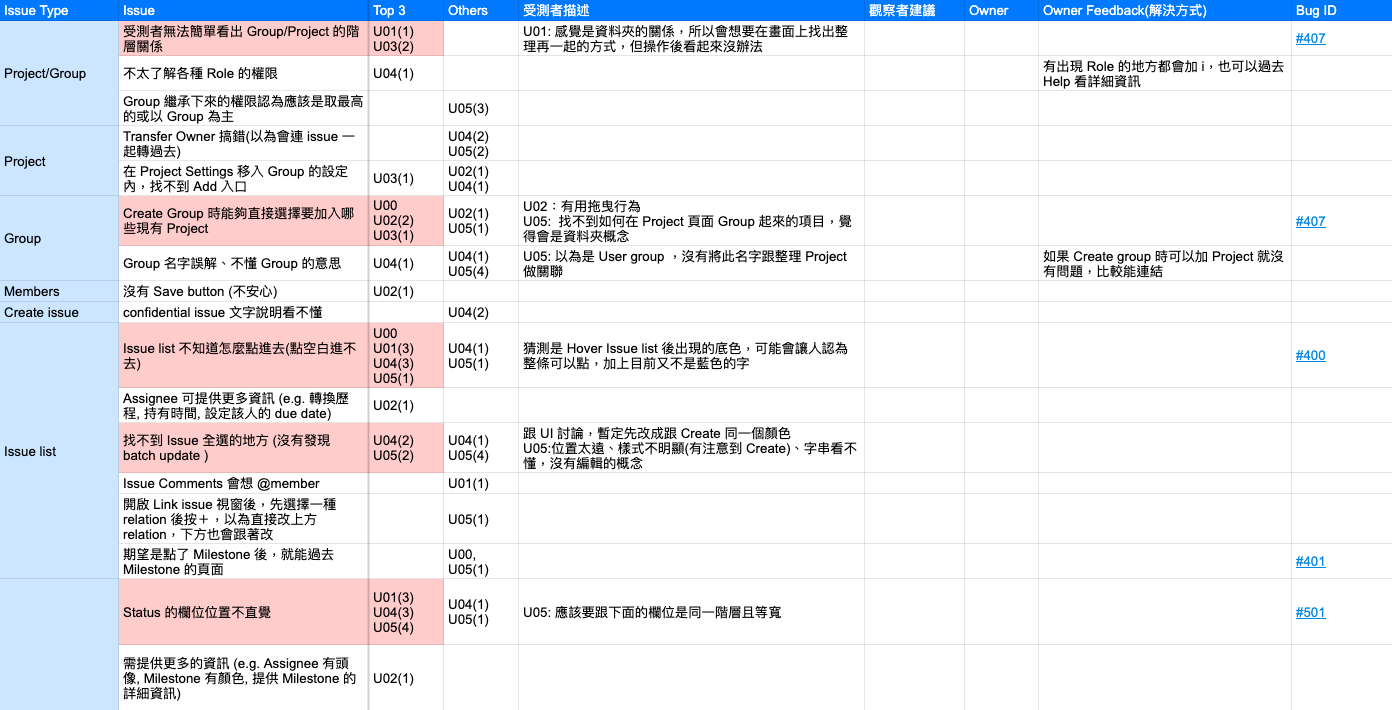
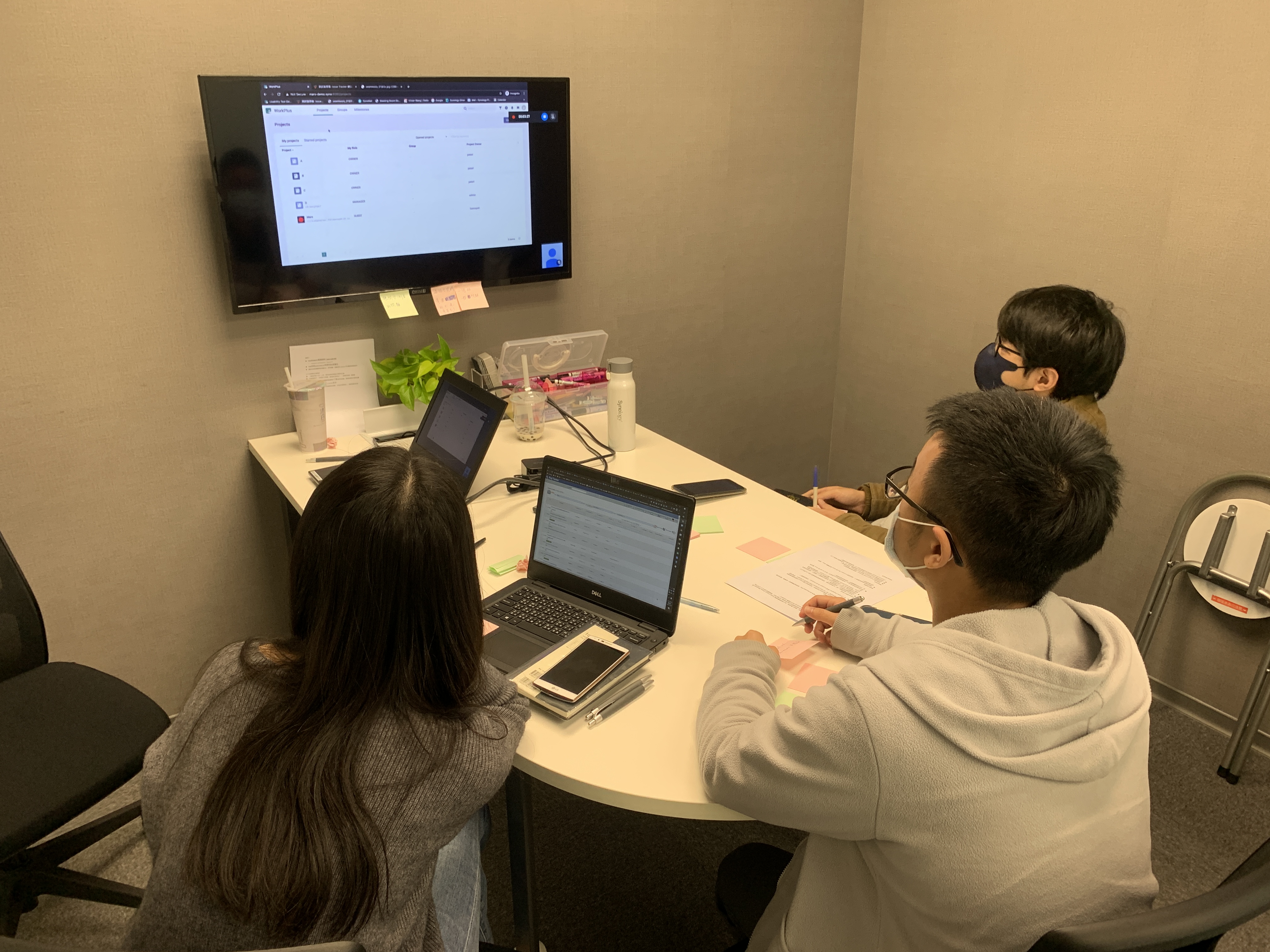
When I conducted tests in the interview room, the rest of the project members recorded usability issues in an observation room. After each usability test, all project members recorded the top three usability issues on post-its and we categorized the same issues into groups.
Observation room
Categorized the same usability issues into groups
Record of usability issues from post-its and categorization
Design Changes
I proposed the design solutions of repeated issues from usability issues. We fixed these issues in the first milestone and the schedules of other issues were to be arranged by the PM.
Compare the test results of issue search
To verify the improvement of the design of the issue search, I ran the same tasks in the second test. The user operation time decreased by 42% once the improved design was sent in place.
Comparison of the average time of each task from the two usability tests
42%
Operation time decreased
Outcome
I resolved 94% of the usability issues from the old system and increased the system satisfaction (System Usability Scale) by 95%. We have successfully brought a better user experience to 700+ internal users. In addition, management was so impressed with the product that it will potentially be offered for sale to external customers.
94%
Usability issues resolved
+95%
System satisfaction of usability
700+
internal users
Showcase
Easily create an issue
Intuitive field orders and clear essential * marks make users create an issue easily. Clicking "Assign to me" to quickly add a personal task.
Simplified editing process
Click to edit a field directly instead of the complicated edit mode.
Brand-new search methods
Using multiple search criteria via an AND/OR operator, it could meet all users' needs.
Quickly find issues by creating a custom filter
Users can find the issues through two clicks on a custom filter
One click to find your task
Easily search for the issues assigned to you from different projects.
Fast track the schedule
Combining the project schedule with issues allows users to easily check when to complete the task.
Takeaway
Designed in Scrum
I tried to optimize the previous design process. When I started designing a function, I proposed the design with key pages and discussed them with the project members during the daily meeting. Then, I delivered detailed interaction design specs. The design process reduced the number of design changes.
Lead a mid-level designer to maintain design consistency
To execute a project with another UX designer, it was necessary to define clearer rules of the components and layouts for maintaining design consistency. I learned how to build a design guideline for a new system, and also got experience in mentoring a designer to execute a project.
Improve the efficiency of usability testing with SEQ
I asked the subjects to fill out the SEQ questionnaire to understand the level of difficulty of each task so that I can save time by focusing on the cause of difficult tasks.








.jpeg)