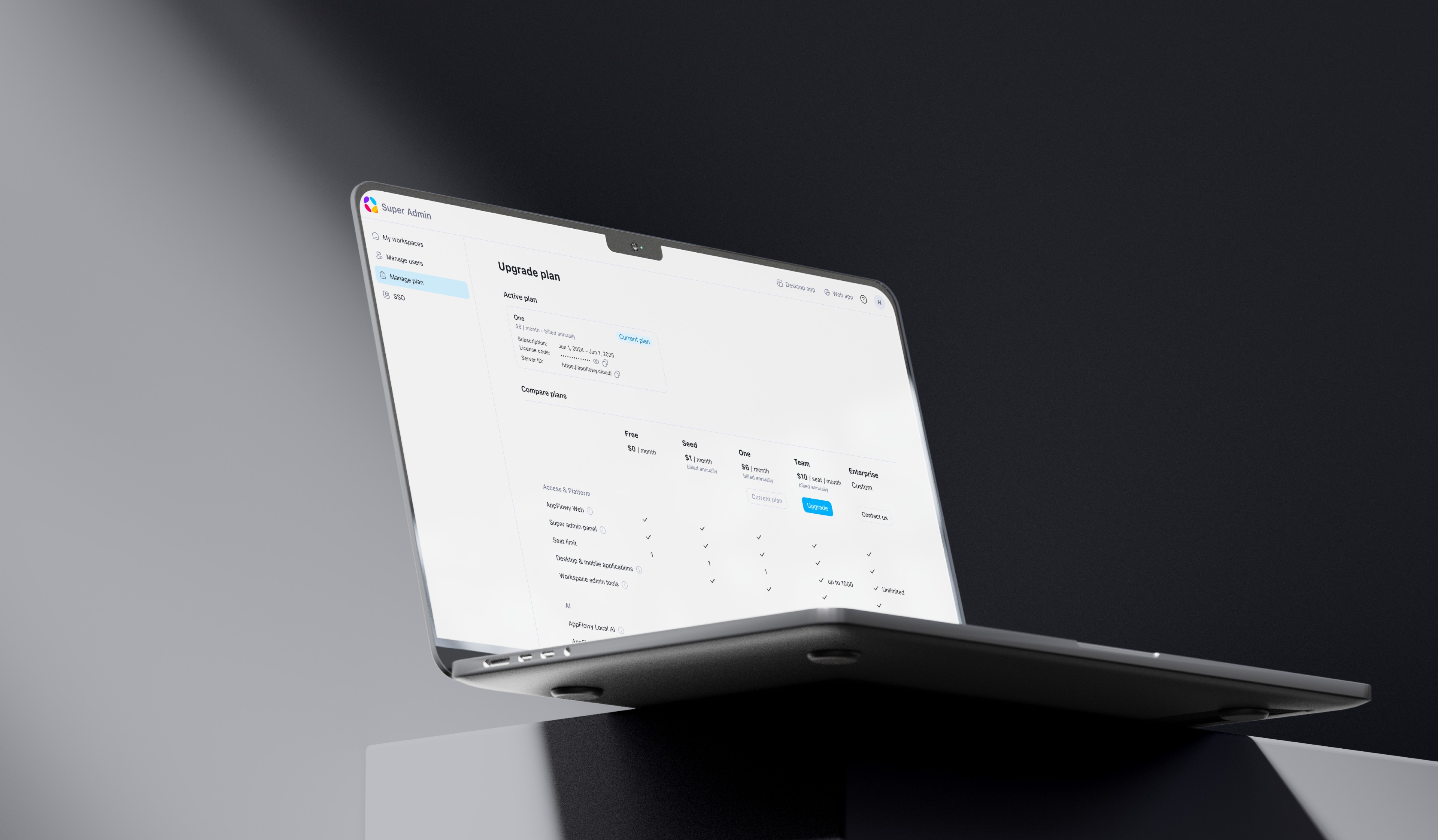
Monetizing Collaboration in AppFlowy Enterprise

Permission structure, admin panel, and upgrade flows for the first enterprise plan.
Project Type
Enterprise monetization
duration
01/2025 – 06/2025
Team Members
CEO
Flutter Engineer
Web Engineer
Backend Engineer
MY Role - Founding Product Designer
  • Designed upgrade flows around collaboration limits, helping teams move from free to enterprise plans.
  • Mapped access request and approval flows across different roles, including notification and email experiences.
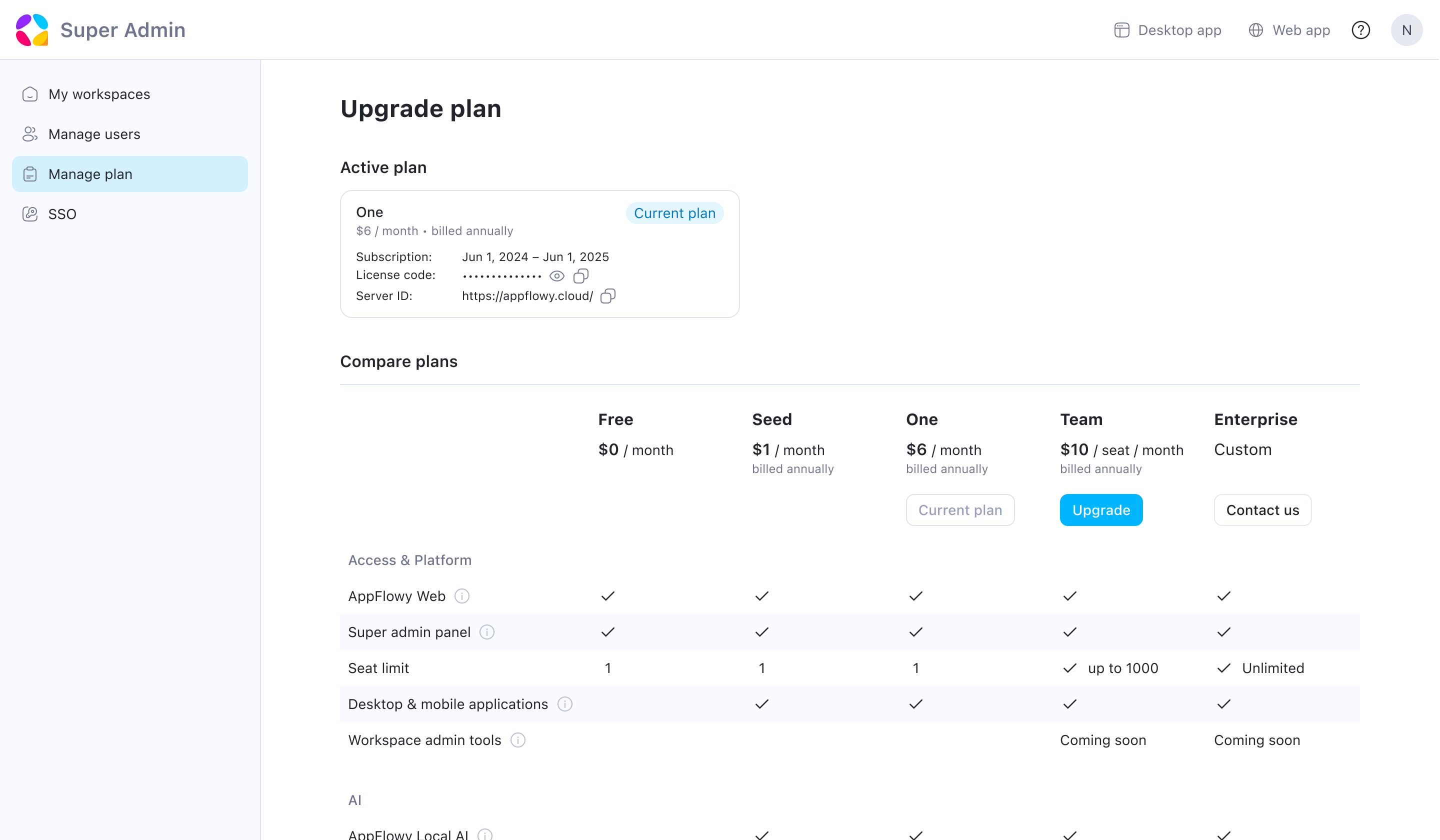
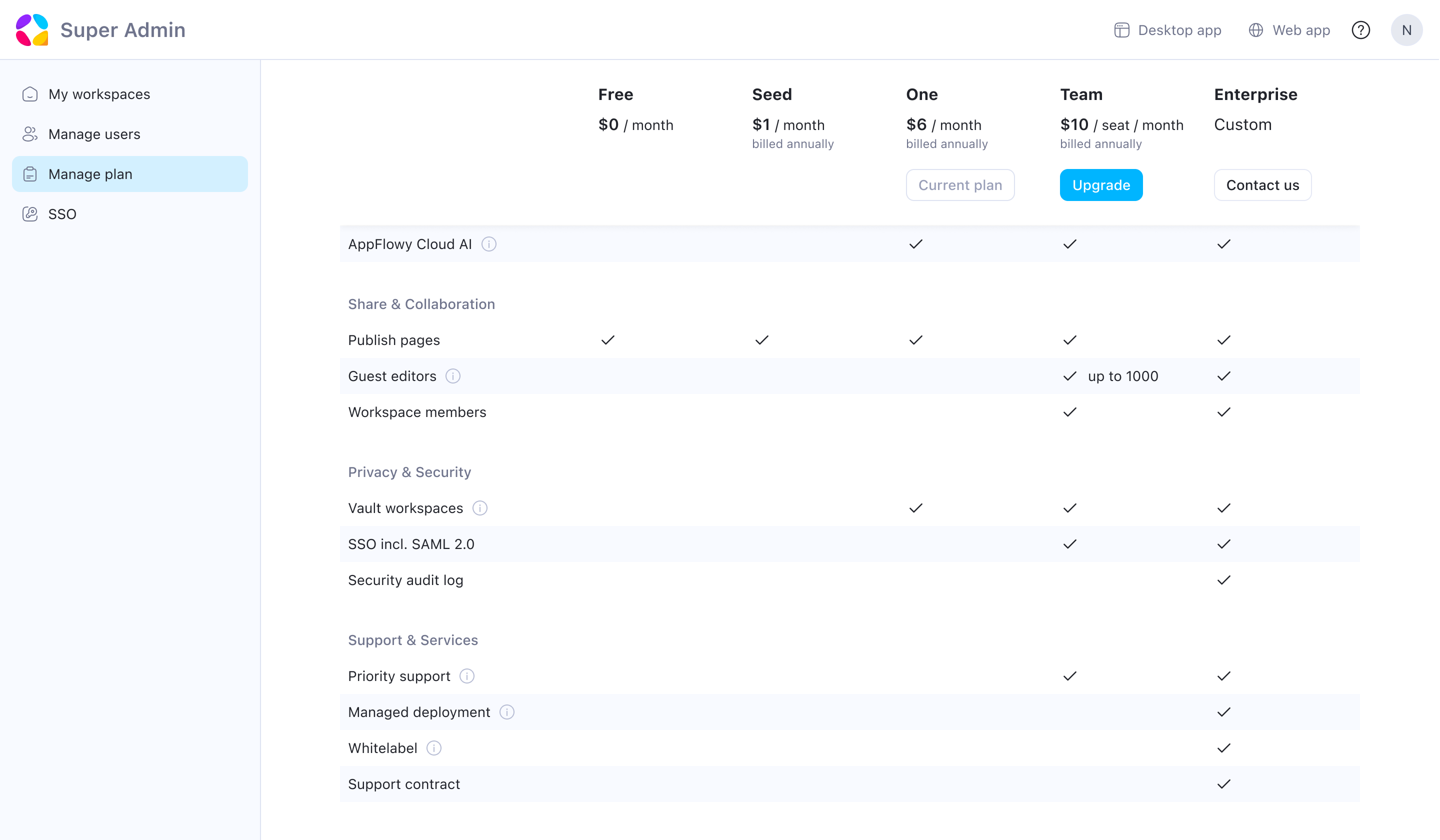
  • Co-designed the in-product pricing surface with the CEO: plan comparison, feature categorization, and upgrade flows.
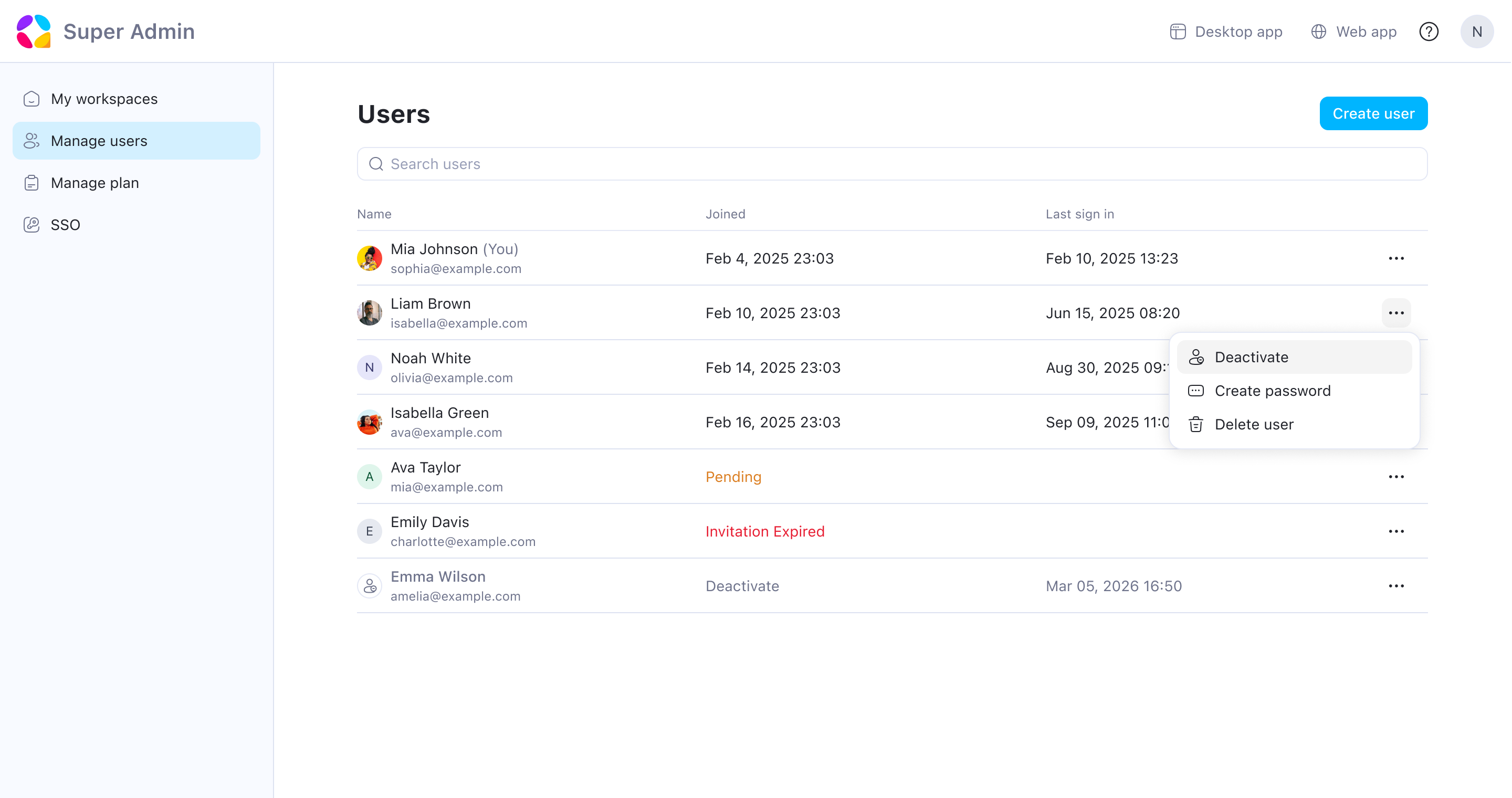
  • Built the admin panel from 0 to 1: user management, access control, and login portal.
  • Defined the permission structure across roles: visibility rules and guest capabilities.
Impact
  • Drove 2× monthly revenue growth through the launch of AppFlowy’s self-hosted enterprise offering.
  • Expanded adoption from small teams to enterprises with 20,000+ employees.
  • Enabled top-down enterprise adoption through centralized admin control.
  • Established team collaboration as the company’s primary monetization driver.

Business Context

When I joined this project, AppFlowy already had around 40,000 free users, mostly small teams and self-hosted users.

People were actively collaborating in the product, but the experience was still very flat:

  • Everyone had similar access by default
  • There wasn't a clear separation between external and internal users
  • Admins had very limited control over how their workspace was structured

Revenue was low, and the team wanted to introduce an enterprise plan for teams that needed more control.

The initial request from the CEO was simple: "We need permissions and guest access."

But after reviewing user feedback, it became clear that the problem was bigger than permissions alone. It was about how collaboration breaks down when teams grow.
Discovery

Before designing anything, I ran two small surveys (72 responses), mostly from self-hosted users. I was looking for two things: where teams might be willing to pay, and what the product was still missing.

Project managers and freelancers needed to share specific documents with external clients, but collaboration broke down when access extended outside the organization.

Team leaders needed control over visibility, permissions, and group access as teams scaled. Trust and coordination became organizational concerns rather than individual ones.

Both came down to the same gap:

Access control and management had become team-level needs, but the product still gave everyone the same access.

Where Upgrades Happen

At first, we focused on where upgrade prompts should appear. But after reviewing user behavior, I noticed that upgrades were usually triggered when collaboration was blocked, not when someone happened to visit the pricing page. That shifted the design focus from the paywall itself to the collaboration flows that led people there.

Monetization system

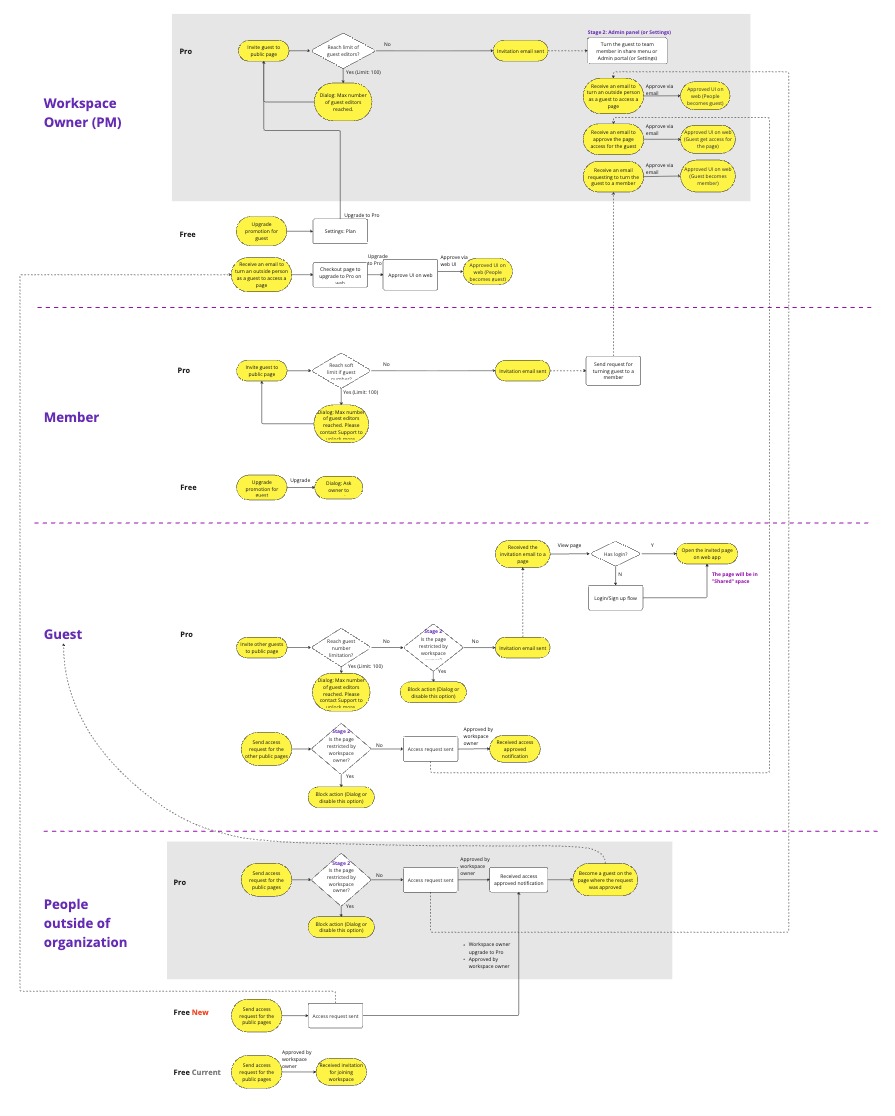
I mapped the full set of flows across every role before designing any single screen, so I could lock the scope with the team and make sure no role hit a dead end.

The upgrade experience needed to adapt based on who hit the limit, what they were trying to access, and how that request should navigate through their team.

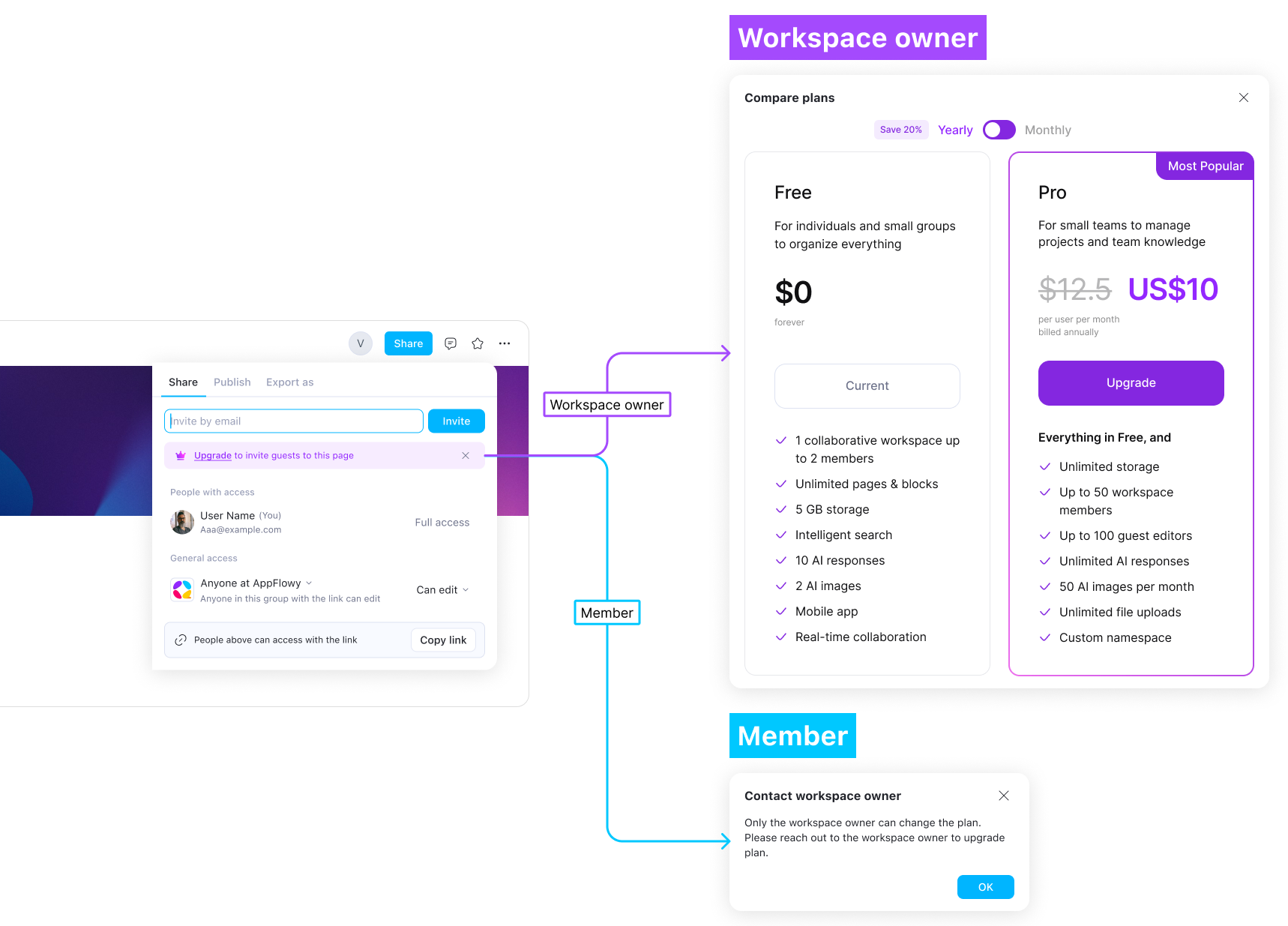
Different upgrade paths by role

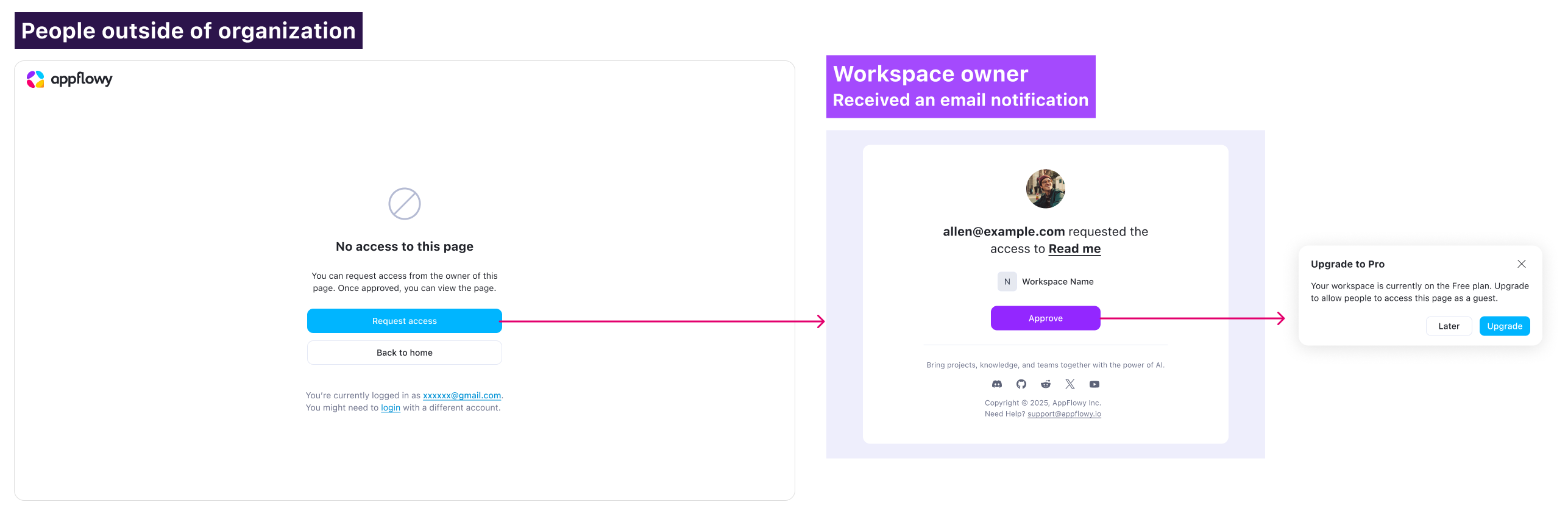
A workspace owner who hits a limit while inviting someone sees the pricing page and can upgrade right away. A member who hits the same limit sees a different message: contact the workspace owner. The difference is what happens next: a member doesn't just get stuck, they're pointed to the person who can actually do something about it.

Access requests as part of the upgrade flow

When an external user requests access, the approval action becomes the conversion moment. The owner upgrades to solve the access problem, not because they saw a marketing email.

I designed the notification flow and email templates so users could understand the request and take action immediately.

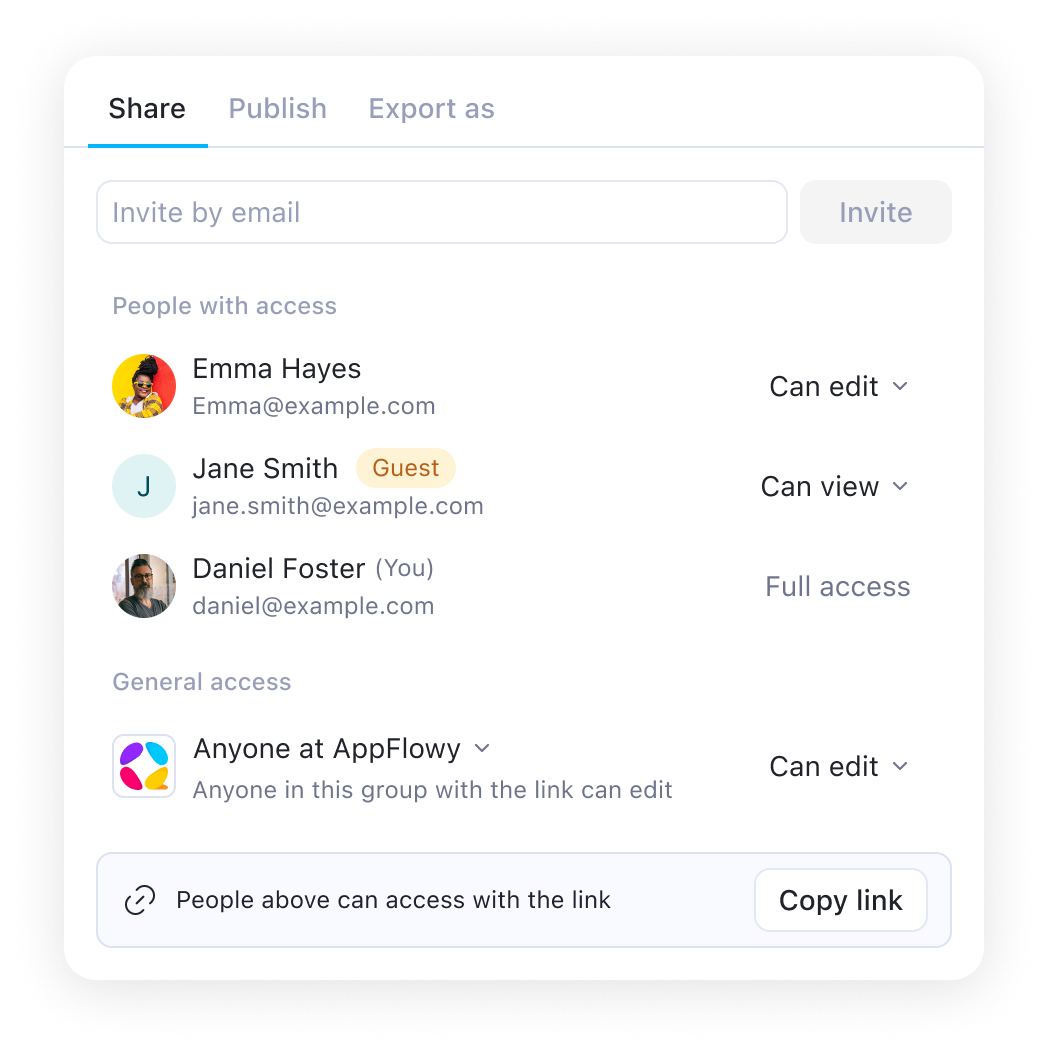
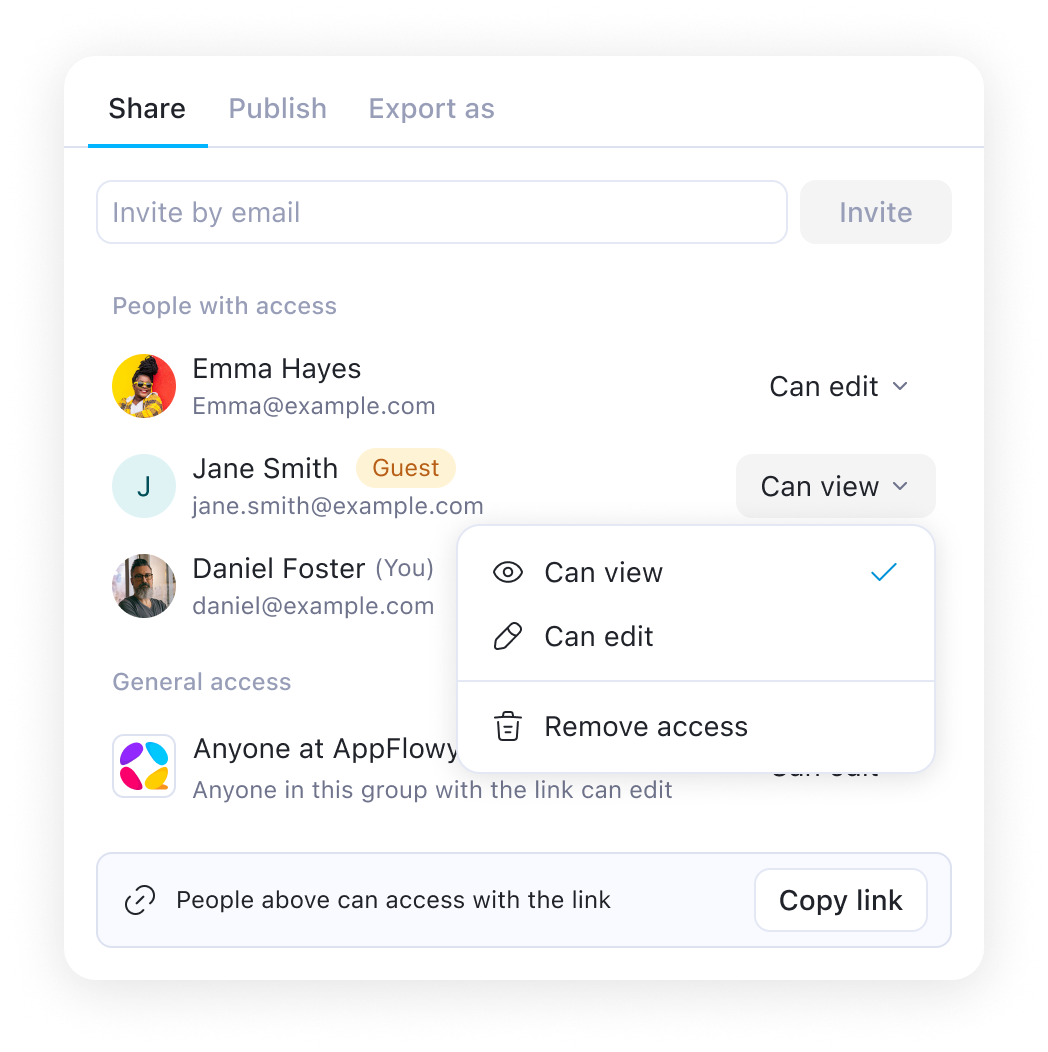
Page permissions and guest access

I defined the permission model across the whole workspace, not only for guests: what guests can see and do, what members can manage, and who controls access settings.

One constraint was keeping it consistent across cloud and self-hosted setups, so the model had to stay simple enough to work the same way in both.

Enterprise Control Layer

As self-hosted teams grew, they needed a centralized way to manage users, workspaces, and access controls.

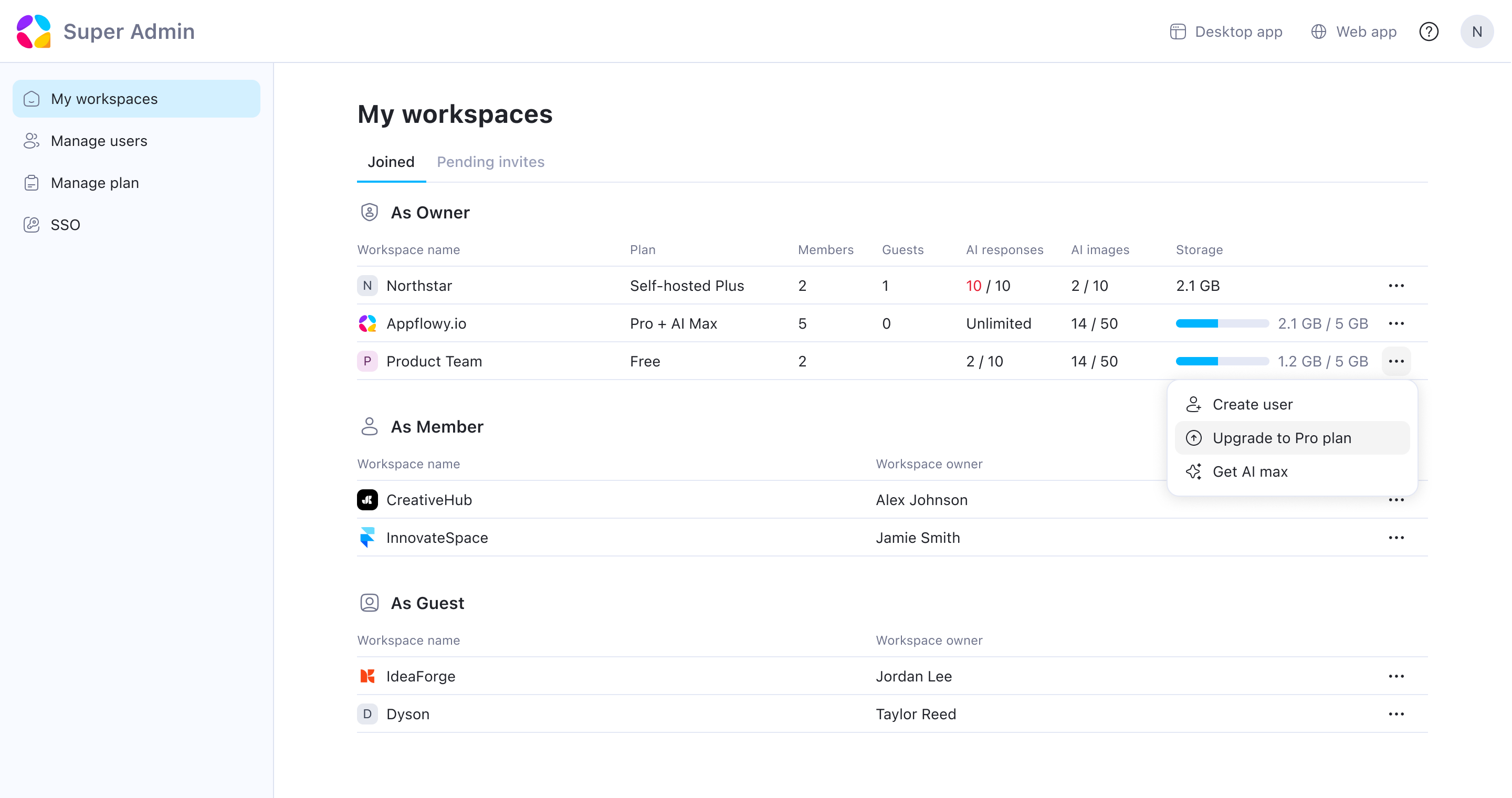
Super admin: one view of the whole org

Enterprise and self-hosted customers needed to manage the whole organization, so I designed a super admin panel from scratch. From one view, the owner (often someone who doesn't use the product daily but is accountable for it) can see every workspace and manage plans.

Managing users across the organization

The same system handles the full user lifecycle: creating accounts, deactivating users, and removing access when someone leaves.

Pricing page clarity

I co-designed the pricing surface with the CEO. While reviewing competitor pricing pages, I noticed that plan actions often moved out of view as users compared features. To keep the upgrade decision visible, I pinned the plan header so pricing and actions stayed accessible while scrolling.

Outcome

This project launched AppFlowy's first enterprise plan, enabling teams to manage access, control visibility, and upgrade without leaving their workflows. After launch, monthly revenue doubled within three months, and the biggest driver of those upgrades turned out to be team collaboration, not AI.

2×

MONTHLY REVENUE
(within 3 months of launch)

20,000+

LARGEST TEAM AT ADOPTION
(from small team to enterprise)

#1

REVENUE DRIVER
(team collaboration, not AI)
Next Project

AppFlowy AI

AI-powered meeting, writing, and chat to keep users within AppFlowy.

View Case Study ->

Back to Home Page